Effective November 15, 2022, when a student, employee, or affiliate departs the university, their Connect Google Workspace account authentication automatically switches from SSO and Duo MFA to Google 2-Step Verification (2SV). From the exact moment their university affiliation ends, they are given a 7-day window to complete their new 2SV enrollment.
Steps for Securing Accounts Prior to Leaving
- Ensure they enter a recovery personal email address: https://myaccount.google.com/recovery/email
- Have them enroll in Google’s 2SV before leaving the university: Google's 2-Step Verification Enablement
- Suggest using Google Takeout Transfer to transfer UCSB account content to a personal account: Takeout: Transfer Your Content
Steps for Releasing Locked Accounts
Functional Accounts
Functional accounts created after December 15, 2022, receive a 7-day grace period to configure 2SV. To avoid lockouts, it is highly recommended to complete this setup during the initial sign-in.
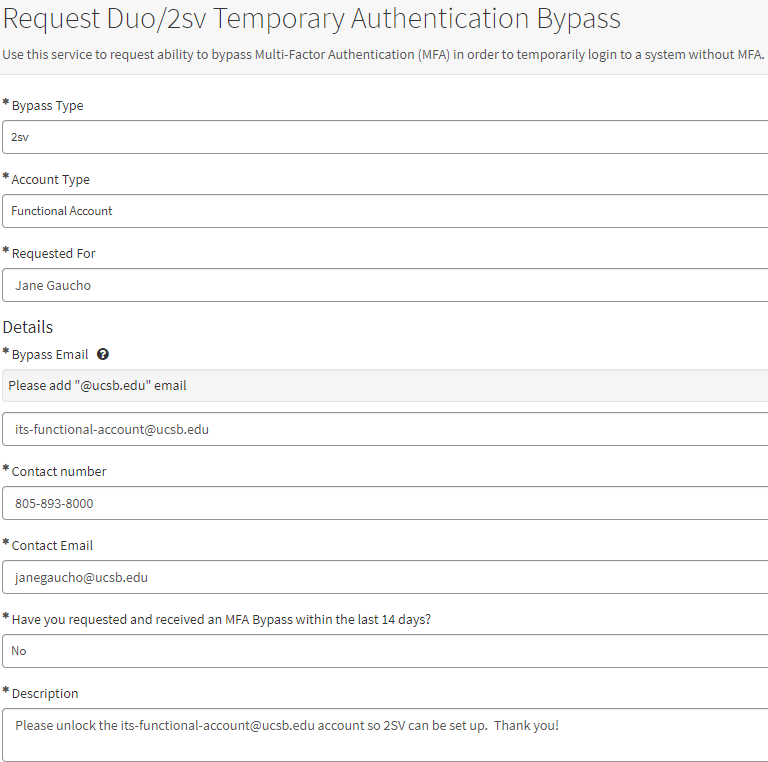
If a functional account failed to set up 2SV prior to December 15, 2022, and the grace period expires, the account will be locked. To restore access, submit a Request Duo/2sv Temporary Authentication Bypass ticket with the following details:
- Bypass Type: Select 2sv
- Account Type: Select Functional Account
- Bypass Email: Enter the functional account's email address
- Contact Info: Provide your own email address and phone number
Once processed, the functional account will be granted a 72-hour bypass window to complete the 2SV enrollment.
Former Employees and Students
Individuals who departed UCSB before November 15, 2022, without configuring 2SV will find their Connect Google accounts locked. For these users - provided they separated from the university prior to October 31, 2024 - you can restore access by submitting a Request Duo/2sv Temporary Authentication Bypass ticket.
When filling out the ticket:
- Bypass Type: Select 2sv
- Account Type: Select Employee/Student
- Contact Info: A personal email address is required. Providing a phone number is highly recommended in case they miss the automated ServiceNow notifications.
Once processed, the user will be granted a 72-hour bypass window to complete their 2SV setup.
Functional Account